
.png)
Description
Download Recast Studio – AI Podcast Marketing Tool, Content Automation, SEO Boost
Overview – Why Recast Studio Is a Game‑Changer for Podcasters
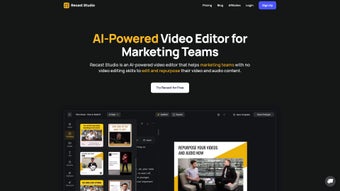
In the crowded world of podcasting, creating fresh promotional material for every episode can feel like a full‑time job. Recast Studio answers that pain point with a cloud‑based, AI‑powered platform that turns a single audio file into a complete marketing ecosystem. By automatically generating video clips, SEO‑friendly blog posts, social‑media snippets, and even email newsletters, the tool lets creators focus on producing great content while the software handles distribution and engagement. The subscription model includes unlimited episode processing, access to branded templates, and regular AI model updates that keep transcriptions and content suggestions accurate. Whether you’re a solo host looking to grow a niche audience or a network managing dozens of shows, Recast Studio streamlines the content‑creation workflow, reduces manual editing time, and maximizes the reach of each episode across YouTube, Instagram, LinkedIn, and email campaigns. Its intuitive dashboard, combined with generative AI that understands podcast context, means you can produce professional‑grade promotional assets in minutes rather than hours. The result is higher listener acquisition, stronger SEO performance for show notes, and a more consistent brand presence without hiring a full‑time marketing team. In addition, the platform’s analytics give you real‑time insight into which assets drive the most traffic, allowing you to refine your strategy on the fly. For podcasters who want to stay competitive while keeping production costs low, Recast Studio offers a secure, scalable solution that grows with the show.
Key Features That Set Recast Studio Apart
- Automatic Transcription & Show Notes: AI‑driven speech‑to‑text engine delivers near‑perfect transcripts within seconds, automatically extracting timestamps, speaker labels, and key takeaways for searchable show notes.
- Multi‑Format Content Generation: One click creates short video clips (with animated waveforms), blog posts optimized for Google SEO, Instagram reels, TikTok snippets, and LinkedIn articles.
- Branded Template Library: Choose from a growing collection of customizable templates that include your logo, color palette, and intro/outro animations, ensuring every piece of content feels uniquely yours.
- Automatic Captions & Subtitles: Every video clip receives auto‑generated captions in multiple languages, boosting accessibility and engagement on platforms that favor captioned content.
- Email Draft Builder: The platform composes concise email newsletters summarizing episode highlights, complete with clickable links to audio, video, and blog versions.
- AI‑Powered Editing Tools: Trim clips, add background music, insert call‑to‑action graphics, and adjust visualizations using a drag‑and‑drop editor that learns from your past edits.
- Analytics Dashboard: Track performance metrics such as video views, blog traffic, email open rates, and social engagement directly from the Recast Studio interface.
- Secure Cloud Storage: All assets are stored on encrypted servers with regular backups, giving you peace of mind that your content is safe and compliant with privacy standards.
These capabilities are bundled into a single subscription, eliminating the need for separate transcription services, video editors, and content‑management tools. The AI models are continuously refined based on user feedback, meaning the more you use Recast Studio, the smarter it becomes at identifying the most compelling moments in your podcast and turning them into shareable assets. For example, the “Highlight Detector” automatically surfaces the most emotionally charged or information‑dense 30‑second segments, which are often the best candidates for viral clips. The platform also offers an API for developers who want to embed the generation engine into custom workflows, making it a versatile hub for both marketers and tech‑savvy podcasters. Overall, the feature set is designed to reduce friction, accelerate production, and keep branding consistent across every distribution channel.
Installation, Usage & Compatibility – Getting Started in Minutes
Step‑by‑Step Setup
Recast Studio is a web‑based application, so there’s no traditional “installation” process. Simply visit recaststudio.com, click “Start Free Trial,” and create an account using your email or a single‑sign‑on option (Google, Apple, or Microsoft). After confirming your email, you’ll be taken to the dashboard where you can connect your podcast hosting platform (e.g., Anchor, Libsyn, or Spotify) via API keys or RSS feed import. Once linked, the platform automatically pulls new episodes as they’re published, so you never have to manually upload files.
How to Process an Episode
1. Select an Episode: Click on the episode thumbnail in the “New Episodes” pane.
2. Choose Output Formats: Toggle switches for video, blog post, social clips, and email.
3. Apply a Template: Pick a branded template or start from a blank canvas.
4. Review AI Suggestions: The system highlights the most engaging 30‑second segments, suggests headings for the blog post, and drafts an email summary.
5. Publish or Export: Directly publish to YouTube, Instagram, or your CMS, or download the assets for later use.
6. Analyze Results: Use the built‑in analytics panel to see how each asset performs and make data‑driven adjustments for future episodes.
Compatibility
Because Recast Studio runs entirely in the browser, it is compatible with all major operating systems:
- Windows 10/11 (Chrome, Edge, Firefox)
- macOS Monterey and later (Safari, Chrome, Firefox)
- Linux distributions with a modern browser
- iOS 14+ and Android 9+ via the responsive web interface (no native app required)
The only technical requirement is a stable internet connection with at least 5 Mbps download speed to ensure smooth video rendering. All processing is performed on Recast Studio’s secure cloud servers, so your local device’s hardware specifications have minimal impact on performance. For teams, the platform offers role‑based access controls, allowing editors, marketers, and analysts to collaborate without sharing passwords. Integration with Zapier and native webhook support lets you automate workflows such as posting new clips to Buffer or updating a Trello board when a blog draft is ready.
Pros, Cons & Frequently Asked Questions
Pros
- All‑in‑one solution eliminates the need for multiple third‑party tools.
- AI transcription is fast and highly accurate, reducing manual editing time.
- Branded templates keep your visual identity consistent across platforms.
- Automatic captioning improves accessibility and SEO on video platforms.
- Cloud‑based workflow works on any device, from Windows laptops to iOS phones.
- Analytics dashboard provides clear ROI metrics for each piece of content.
- API access allows custom integrations for advanced users.
- Secure cloud storage with encrypted backups protects your assets.
Cons
- Subscription pricing may be high for hobby podcasters with a limited budget.
- Heavier reliance on internet connectivity; offline editing is not possible.
- Advanced customization (e.g., custom animation scripts) is limited compared to professional video editors.
- Learning curve for users unfamiliar with AI‑driven content suggestions.
- Limited language support for transcription beyond the core four languages.
FAQ (FAQPage)
How accurate are the AI transcriptions?
Recast Studio uses state‑of‑the‑art speech‑to‑text models trained on diverse audio sources. In most cases, accuracy exceeds 95 % for clear speech. Background noise or strong accents may require minor manual correction, which can be done directly in the editor.
Can I export raw audio files after processing?
Yes. The platform stores the original episode file and allows you to download it alongside the generated assets, giving you full control over the source material.
Is there a free tier?
Recast Studio offers a 7‑day free trial with full feature access. After the trial, a monthly subscription is required; there is no permanently free version, but the trial lets you evaluate the full workflow.
How does the SEO‑optimized blog post work?
The AI scans the transcript, extracts key topics, and structures the content with headings, meta descriptions, and internal linking suggestions. You can edit the draft before publishing to fine‑tune keywords and add personal touches.
Does Recast Studio support multiple languages?
Transcription currently supports English, Spanish, French, and German. Caption generation follows the same language set, with plans to expand to additional languages in upcoming updates.
Can I integrate Recast Studio with my existing workflow tools?
Yes. Recast Studio offers native Zapier integration, webhooks, and a REST API, allowing you to automatically push new clips to Buffer, schedule posts in Hootsuite, or trigger notifications in Slack.
Conclusion – Boost Your Podcast Reach with Recast Studio Today
Podcasting is no longer just about audio; it’s about an entire content ecosystem that feeds listeners, search engines, and social media algorithms. Recast Studio gives you the tools to turn a single episode into a multi‑channel marketing machine, all while saving you countless hours of manual work. The AI‑driven workflow, robust template library, and comprehensive analytics make it a compelling investment for creators serious about growth. While the subscription cost may seem steep for beginners, the time saved and the amplified audience reach quickly offset the expense. If you’re ready to transform your podcast into a high‑impact brand, click the link below to start your free trial and experience the power of automated content creation.
Start Your Free Trial of Recast Studio Now
Overall Rating: 4.5 / 5
Recast Studio delivers a seamless, AI‑powered experience that dramatically reduces the workload of podcast marketing. Its strongest points are the automatic transcription, multi‑format output, and branding consistency. Minor drawbacks such as price and limited offline capability are outweighed by the productivity gains for most professional podcasters.
Guides & Tutorials for Recast Studio
How to install Recast Studio
- Click the Preview / Download button above.
- Once redirected, accept the terms and click Install.
- Wait for the Recast Studio download to finish on your device.
How to use Recast Studio
This software is primarily used for its core features described above. Open the app after installation to explore its capabilities.
User Reviews for Recast Studio 0
No reviews found




